
Large codebases expose weaknesses that toy demos can hide.
A coding agent can look impressive in a clean repo with one build command and a handful of services. The real test is messier: multi-million-line monorepos, legacy systems spread across decades, polyglot stacks, and organizations where thousands of developers change the code faster than any centralized index can keep up.
Anthropic’s core claim is simple: Claude Code works in those environments not because it memorizes the whole codebase, but because it navigates the live codebase the way a strong engineer would.
Table of contents
Open Table of contents
The key idea: live navigation beats stale retrieval
Claude Code does not depend on a prebuilt codebase index. It walks the filesystem, reads files, searches with grep-like tools, and follows references from the code that exists right now on the developer’s machine.
That matters because large organizations constantly invalidate centralized retrieval systems. If embeddings or code indexes lag behind the repo by even a few hours, the agent can be pointed at functions that were renamed, modules that were deleted, or architecture that no longer exists.
Agentic search avoids that failure mode. The trade-off is that navigation quality depends heavily on how much structure the codebase gives the agent:
- clear directory boundaries,
- focused context files,
- scoped build and test commands,
- symbol-aware navigation,
- and good on-demand tooling.
If the codebase is legible, the agent can work from first principles. If the codebase is chaotic, the model spends its context budget just figuring out where reality lives.
The harness matters more than the model
One of the strongest ideas in the original article is that teams over-focus on model choice and under-focus on the harness around the model.
The harness is the system that makes the model usable inside a real engineering environment. In practice, it includes:
CLAUDE.mdfiles for durable codebase context,- hooks for deterministic automation and continuous improvement,
- skills for task-specific expertise loaded only when needed,
- plugins for packaging and distributing good setups,
- LSP integrations for symbol-level navigation,
- MCP servers for internal tools and structured data access,
- and subagents for separating exploration from execution.
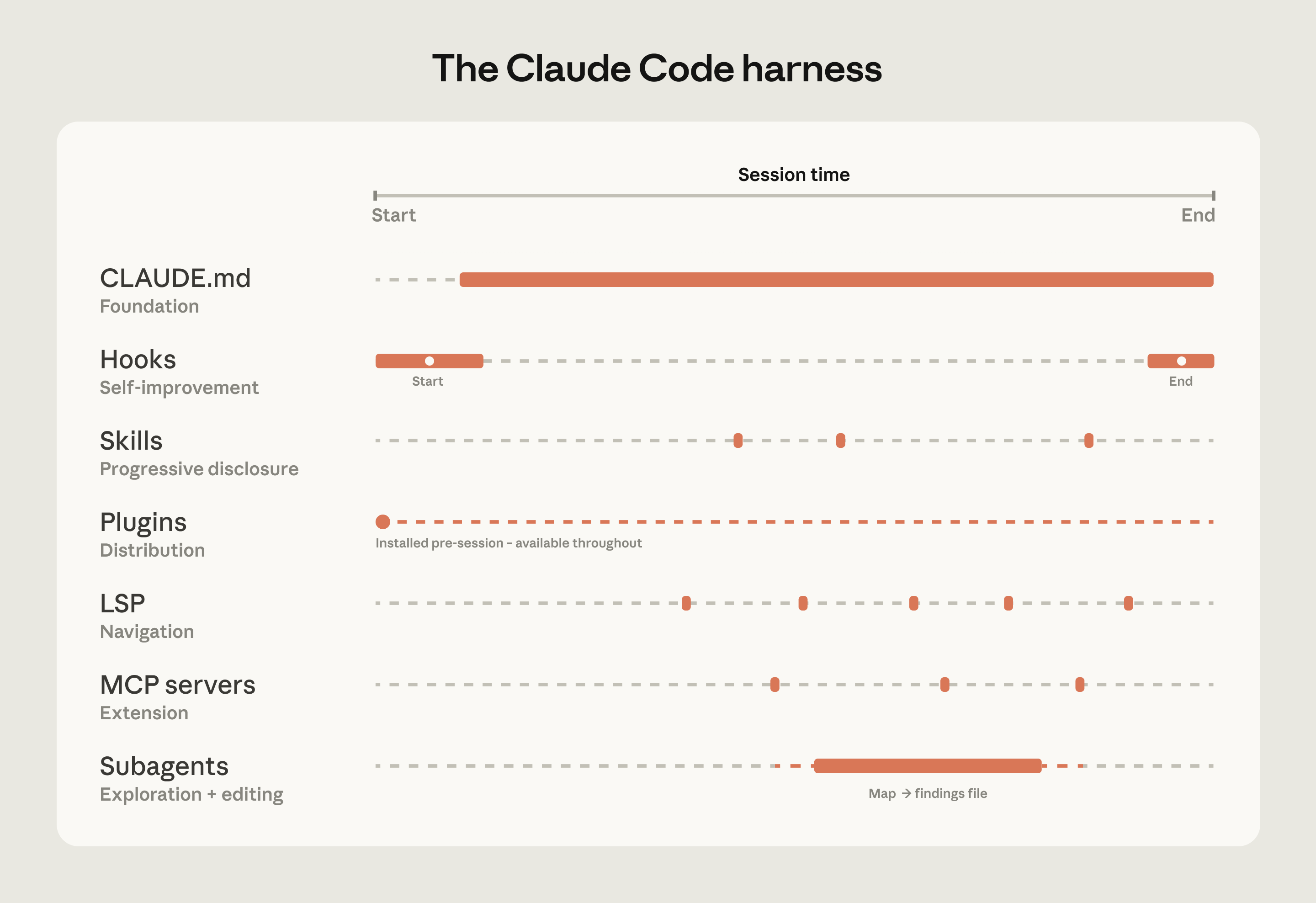
The important shift is organizational as much as technical: stop treating the model as the whole product, and start treating the surrounding harness as the real multiplier.
The ordering matters too.
CLAUDE.md comes first because the model needs grounded local context before anything else helps. Hooks come next because they turn repeated advice into deterministic behavior. Skills keep specialized workflows off the hot path until they are actually relevant. Plugins and MCPs then help scale that setup across teams instead of leaving it trapped as tribal knowledge.
LSP is especially important in large codebases. Text search alone is often too noisy when the same identifier appears in many services, languages, or generated artifacts. Symbol-aware navigation lets the agent follow the same edges a developer would use in an IDE.
Three patterns that show up in successful rollouts
1. Make the codebase navigable before asking the agent to be magical
The best teams reduce ambiguity for the agent upfront.
That usually means:
- keeping root
CLAUDE.mdfiles short and structural, - adding subdirectory-level context only where local conventions differ,
- starting the agent in the relevant subdirectory instead of the repo root,
- scoping lint and test commands to the subsystem that changed,
- excluding generated artifacts and vendor noise,
- and adding lightweight maps when the folder structure is not self-explanatory.
This is not prompt engineering theater. It is information architecture for code.
2. Treat configuration as a living system
Instructions that helped an older model can become baggage for a newer one.
A workaround that once prevented mistakes may later slow the agent down or block it from taking actions the newer model can now handle safely. Teams should review their CLAUDE.md, hooks, and skills on a regular cadence, especially after major model or tooling upgrades.
The point is not to keep adding rules. The point is to keep deleting obsolete ones.
3. Assign ownership instead of hoping adoption organizes itself
Bottom-up enthusiasm is useful, but it fragments fast in large organizations.
The rollouts that compound well usually have a clear owner: a developer productivity team, a developer experience group, or at minimum one DRI who owns conventions, permissions, plugin distribution, and rollout policy.
Without that ownership:
- good skills get rebuilt five times,
- useful context stays local to one team,
- security and governance questions arrive late,
- and the first-wave enthusiasm plateaus into uneven adoption.
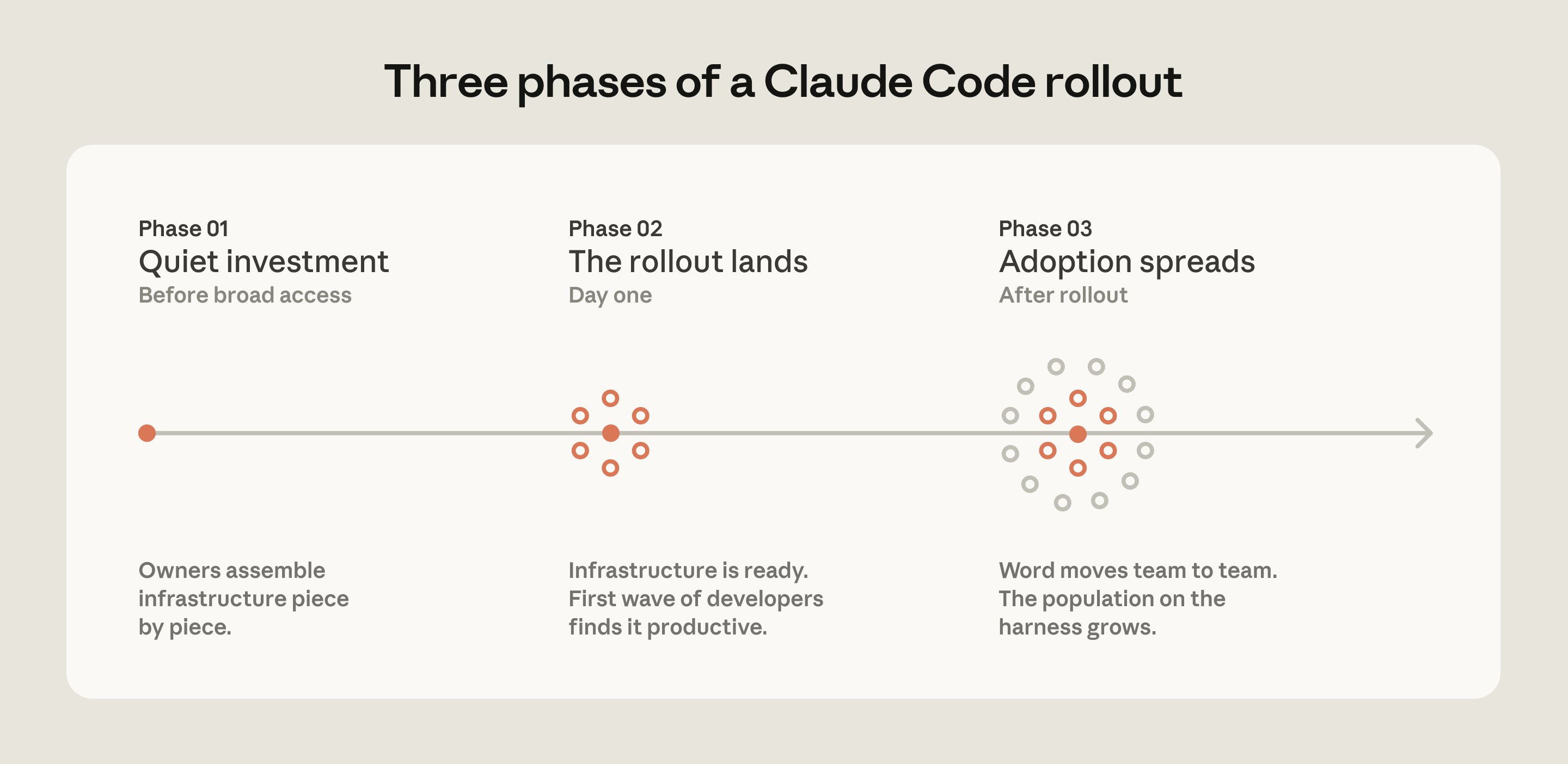
The operational lesson is boring but decisive: productive first-run experience drives adoption more than top-down excitement.
What this means in practice
If you want Claude Code to work in a large codebase, do not start by asking whether the model is smart enough.
Start with harder, more operational questions:
- Can the agent tell where one subsystem begins and another ends?
- Does it know which commands apply in this directory?
- Can it navigate by symbol rather than by string match?
- Are high-value workflows packaged as skills instead of crammed into always-on context?
- Is there a clear boundary between soft guidance and hard guardrails?
- Does one person or team actually own the setup?
Those questions are more predictive of success than another benchmark screenshot.
A practical starting sequence
The cleanest way to adopt Claude Code in a large codebase is usually:
- Write a minimal root
CLAUDE.mdwith structure, critical gotchas, and path-specific pointers. - Add subdirectory
CLAUDE.mdfiles only where commands or conventions truly diverge. - Install LSP support so navigation works at the symbol level.
- Move repeated workflows into skills and repeated enforcement into hooks.
- Package the working setup into plugins so every engineer starts from the same baseline.
- Add MCP servers only after the basic local workflow is already reliable.
- Name a DRI to maintain the system as the model and codebase evolve.
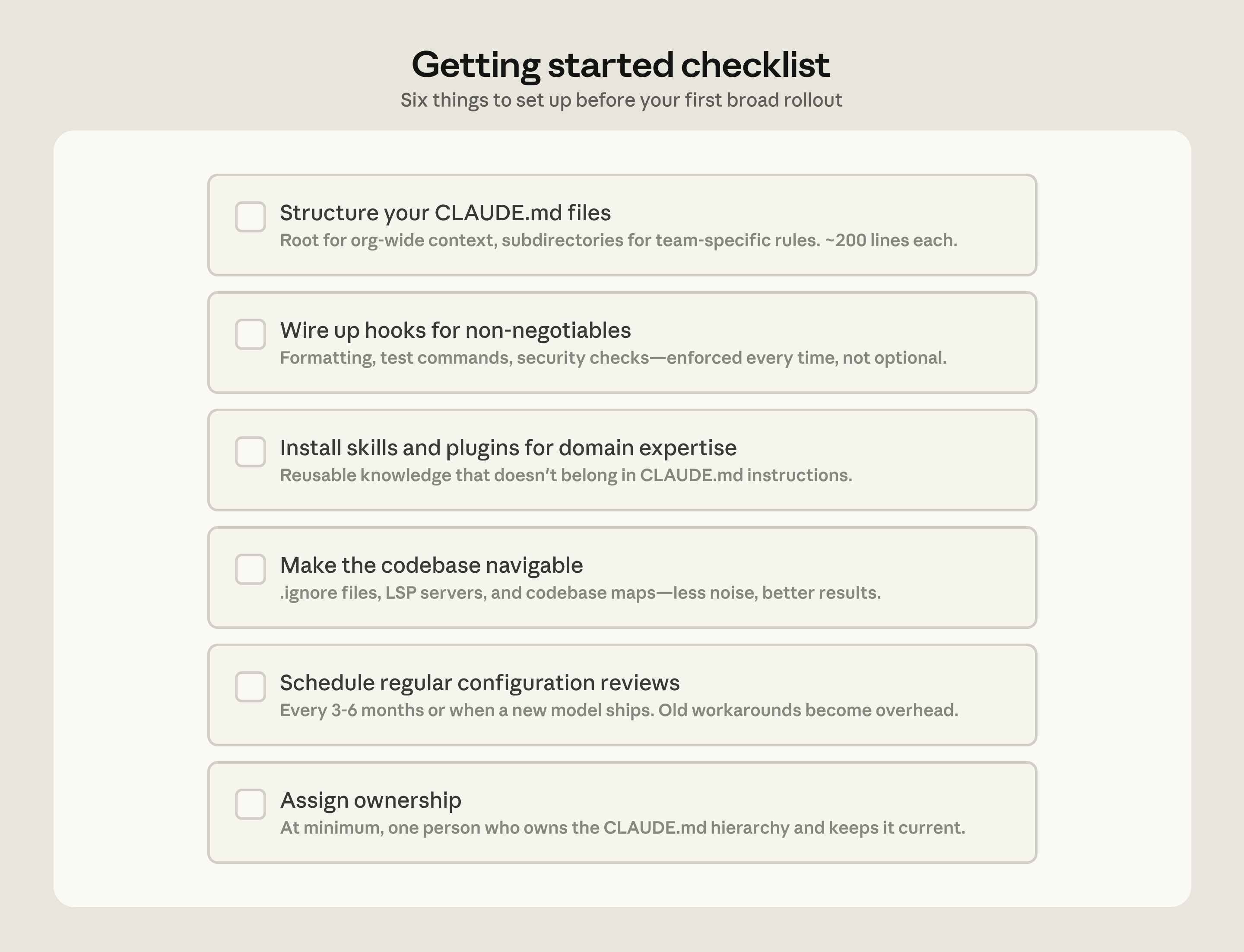
This is the part many teams skip: adoption works best when there is an explicit rollout sequence instead of a vague hope that the model will figure everything out.
The real takeaway
Claude Code scales in large codebases when the environment is built for navigation, not when the model is treated like an all-knowing layer floating above the repo.
That is the real shift in this article. Large-scale success does not come from stuffing more code into context. It comes from giving the agent a live codebase, a disciplined harness, and a codebase structure it can traverse without wasting attention on noise.
In other words: if you want better results from coding agents, spend less time asking for magic and more time making the terrain legible.
Based on Anthropic’s May 2026 article on deploying Claude Code in large codebases, this rewrite focuses on the operational ideas that matter most for engineering teams.